Chapter 1 of 13
What Is an Ideal Customer Profile (ICP)?
An ideal customer profile, or ICP, describes the company your offer fits best. It is the company most likely to buy, stay for a long time and recommend you. Some teams also call it a target customer profile.
ICP, target audience and buyer persona: what is the difference?
| Term | Describes | Key question |
|---|---|---|
| Ideal customer profile (ICP) | The ideal company | Which companies fit us? |
| Target audience | All the companies and people you reach out to | Who do we contact? |
| Buyer persona | The person who buys or helps decide | Who decides there, and what motivates them? |
The ICP comes first. The target audience follows from it, and you build personas for the roles inside those companies. If you start with the persona, you often end up talking to the right person at the wrong company.
Chapter 2 of 13
Define Your ICP: Set Your B2B Target Audience in Four Steps
Here is how to define your B2B target audience:
- 1
Look at your best customers
Take your ten best customers of the last few years. Best means: happy to buy, stayed a long time, good to work with.
- Key question
- Which customers would you take again right away?
- Result
- A list of ten customers.
- At Krämer
- Ms. Krämer picks ten wholesalers.
- 2
Capture company traits
Look for what these companies have in common: industry, size, region, special traits.
- Key question
- What is the same for at least seven out of ten?
- Result
- Three to five traits.
- At Krämer
- Technical wholesale, 100 to 400 employees, several warehouses.
- 3
Define roles
Work out who decides in these companies, who uses the product and who influences the decision.
- Key question
- Who did you have the decisive conversations with?
- Result
- Two to three roles.
- At Krämer
- Managing director, head of logistics, head of IT.
- 4
Add signals and an anti-ICP
Write down how you recognize the right moment, and who you do not contact.
- Key question
- What happened shortly before the purchase, and where did you lose?
- Result
- Two signals and one anti-ICP.
- At Krämer
- New location as a signal. Companies with one warehouse as the anti-ICP.
Chapter 3 of 13
B2B Target Audience Analysis: Firmographics, Roles and Buying Signals
A useful ICP has three parts. Only all three together tell you which company fits, who to talk to there and when the timing is right.
Which company fits?
- Industry
- Number of employees
- Revenue
- Region and locations
- Special traits, for example several warehouses
Who do you contact?
- Decision-makers, for example the managing director
- Users, for example the head of logistics
- Influencers, for example the head of IT
When is the right moment?
- Growth and new locations
- New job postings or leadership changes
- Trade show appearance or investment
- Visit to your website
Pick criteria and watch a long list of companies shrink into a short list that fits.
Your ICP
Nothing selected yet. Pick a criterion on the left.
Your list
A huge number of companies
Without a profile you talk to everyone and hardly ever reach the right people.
An illustration to play with, not market data. The more precise the profile, the smaller and better the list.
How do you find companies that are ready to buy?
A company can be a perfect fit and still not buy, simply because nothing is happening right now. That is why signals belong in your ICP. A signal is a hint that now is a good moment.
- The company is growing, for example through new locations or new hires.
- Someone in management or purchasing has changed.
- The company is exhibiting at a trade show or has just made an investment.
- A contact visits your website, for example your pricing page.
Signals do not replace fit. They only decide which of the companies that fit you contact first.
Chapter 4 of 13
Which Way to Your ICP Fits Your Situation?
No single approach is the right one, because each answers a different question. Start with your situation. Pick the statement below that fits best, and you will see the matching approach and what it looks like in the platform.
Which situation sounds most like yours?
Pick the statement that fits best and see which approach suits you.
Your approach
Database with filters
You set your criteria as filters and immediately see which companies and contacts fit.
How it works in the platform
- “New Search” tab under Leads
- Filters for job title, location, revenue and more
- Save a search and reopen it later
All approaches in one place: Market Intelligence
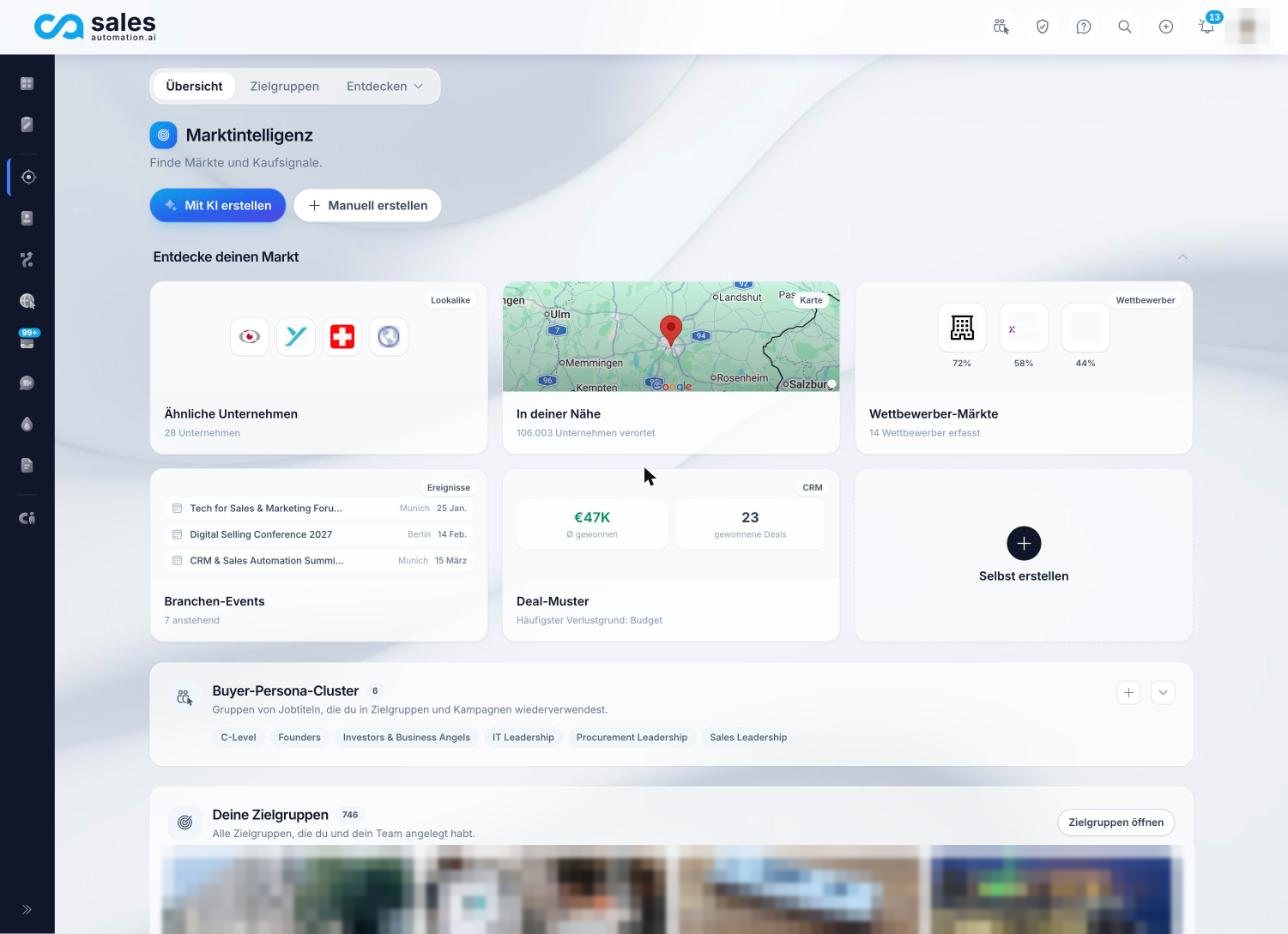
In the platform, you find all approaches in Market Intelligence, in the menu under “Target groups”. Each card is a path to new companies that fit.
Chapter 5 of 13
You Know Which Companies You Want: Lead Database and Filters
Your question
I already know the traits my customers have. How many matching companies are there?
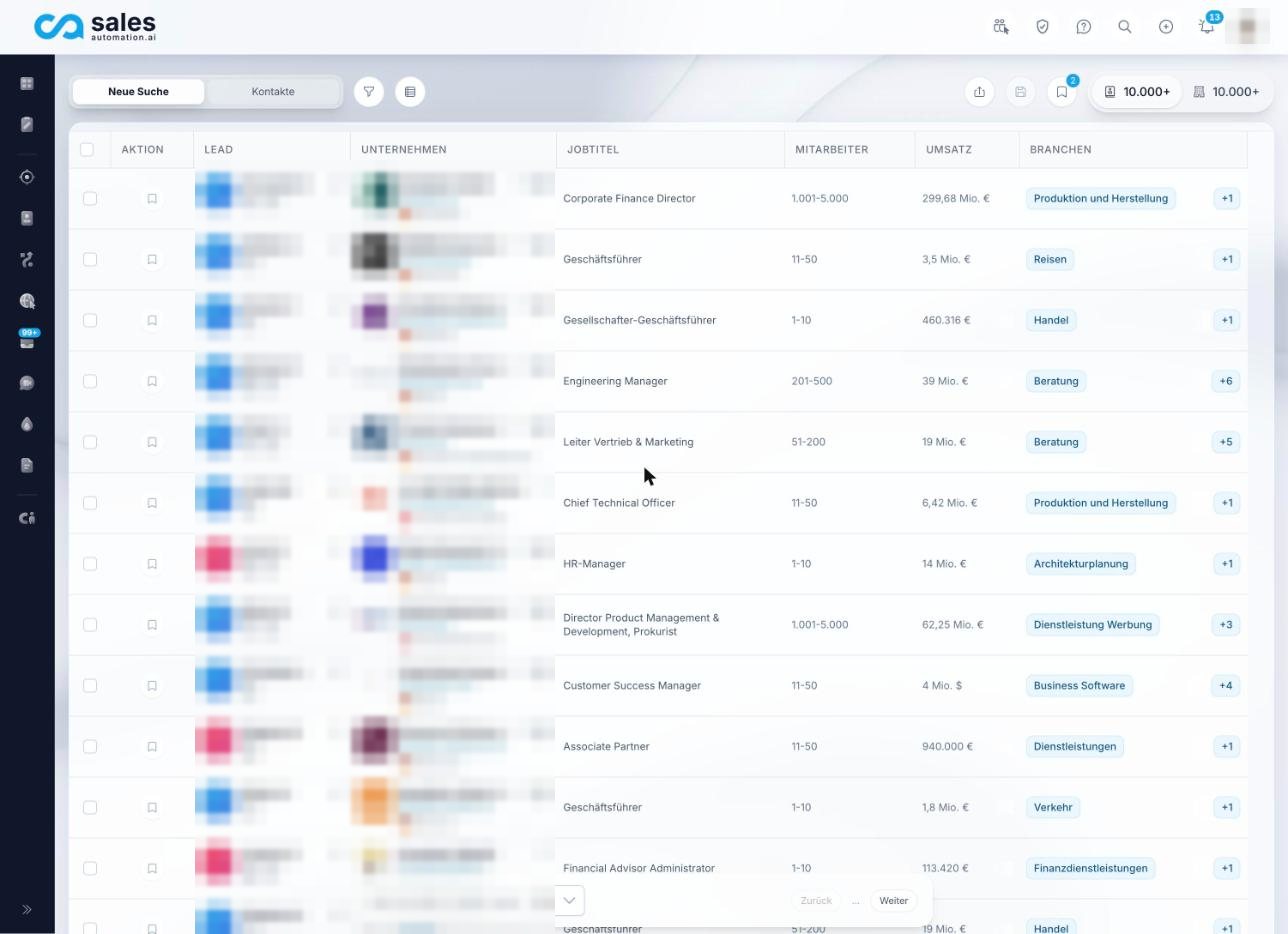
This is the best-known way to build a target audience: a database with filters. You decide which traits a company should have, and you see matching companies and contacts.
How it works in the platform
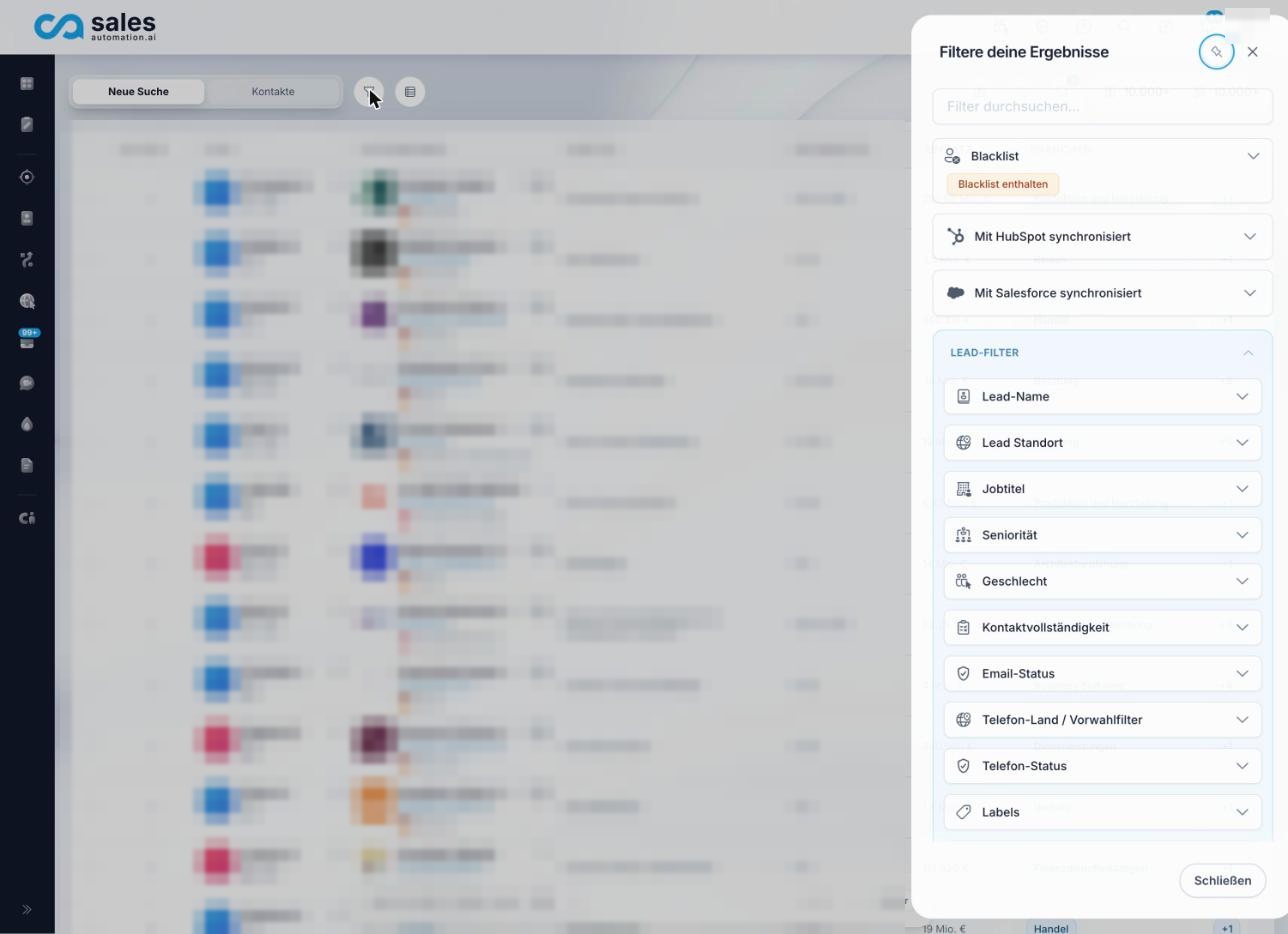
You find it under “Leads” in the “New Search” tab. The filters are split into lead filters and company filters. For leads, you filter by things like job title, seniority, location, contact completeness and email status. For companies, traits such as revenue are added. You can save a search and reopen it later.
Strengths and limits of this approach
The database answers the question “How many companies have these traits?” very quickly. But it tells you nothing about whether those companies would buy from you. For that, you need the next approaches.
Chapter 6 of 13
You Already Have Customers: Closed-Won and Closed-Lost Analysis
Your question
Which companies really buy from me, and why do I lose the others?
The best clues to the right profile are already in your CRM. Won deals (closed won) show who buys. Lost deals (closed lost) show who does not buy, and why. Together they form a deal pattern.
How deal pattern analysis works in the platform
Step 1
Deals from HubSpot
Won and lost deals of your contacts are imported.
Step 2
Short follow-up
Five questions about trigger, champion, alternative and objection.
Step 3
Minimum reached?
Only once there are enough completed follow-ups does it continue.
Step 4
ICP statement
An editable statement made of observed facts.
Step 5
Lookalike list
The size and region of the reference companies shape the search.
Simplified view of the process in the platform.
- The deals come from HubSpot. Other CRM systems are not imported for this right now.
- For each closed deal, your team gets a short follow-up with five questions: trigger, situation before, champion, alternative and objection. It takes about a minute and a half.
- An ICP can only be generated once there is a minimum number of completed follow-ups (default: eight across won and lost combined). That way, nothing is built on too little material.
- The result is an editable ICP statement made up only of observed facts. You can derive a lookalike list from it.
The minimum is a safeguard. If you derive a profile from two deals, you are building on chance.
Chapter 7 of 13
You Want More Customers Like Your Best Ones: Similar Companies (Lookalikes)
Your question
Who is like my best customers and does not know me yet?
Once you know who your best customers are, the next question is: who else looks like them? That is lookalike analysis. It gives you companies that resemble your best customers and that you do not know yet.
How does the algorithm behind it work?
There is no magic behind it, and that is a good thing. The platform works in four steps you can follow:
Step 1
Starting point
Company profile, existing target audiences and best reference companies.
Step 2
AI research
An AI with web search looks for companies you can verify.
Step 3
Comparison
Companies you already know are removed.
Step 4
Suggestion with reasoning
For each company, a reason and a confidence level: high, medium, low.
Simplified view. No mathematical similarity scores are calculated.
- The starting point is your company profile, your existing target audiences and your best reference companies, meaning the companies with the most contacts on your side and your reference customers.
- An AI with web search looks for matching companies you can verify. For each company, it gives a specific reason and a confidence level (high, medium or low).
- Companies you already have contacts at are filtered out, so only new ones remain.
- For known companies, the number of lead matches is real. For unknown companies, it is an estimate and is marked “estimated” on screen.
To be honest
Similarity is not calculated as a mathematical score. An AI with web search explains it. So review the suggestions the way you would a colleague’s recommendation: read the reasoning and ask questions if in doubt.
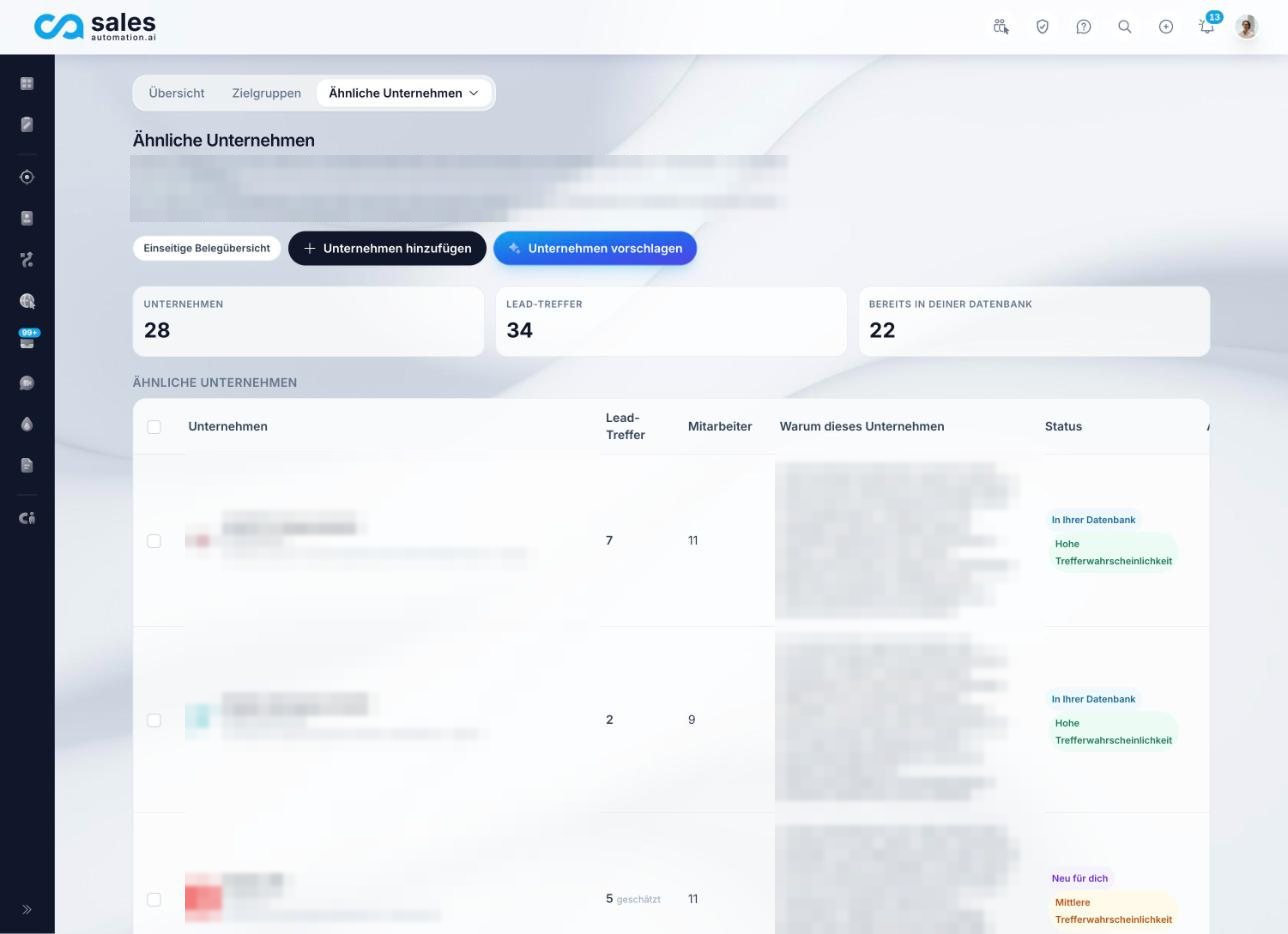
When you select companies, you can order the matching contacts for them. This creates a new target audience that the data team sources. So the leads are not available instantly.
Chapter 8 of 13
You Are Not Sure Yet: Let the AI Ask the Questions
Your question
I only have a rough idea. How do I get to a target audience?
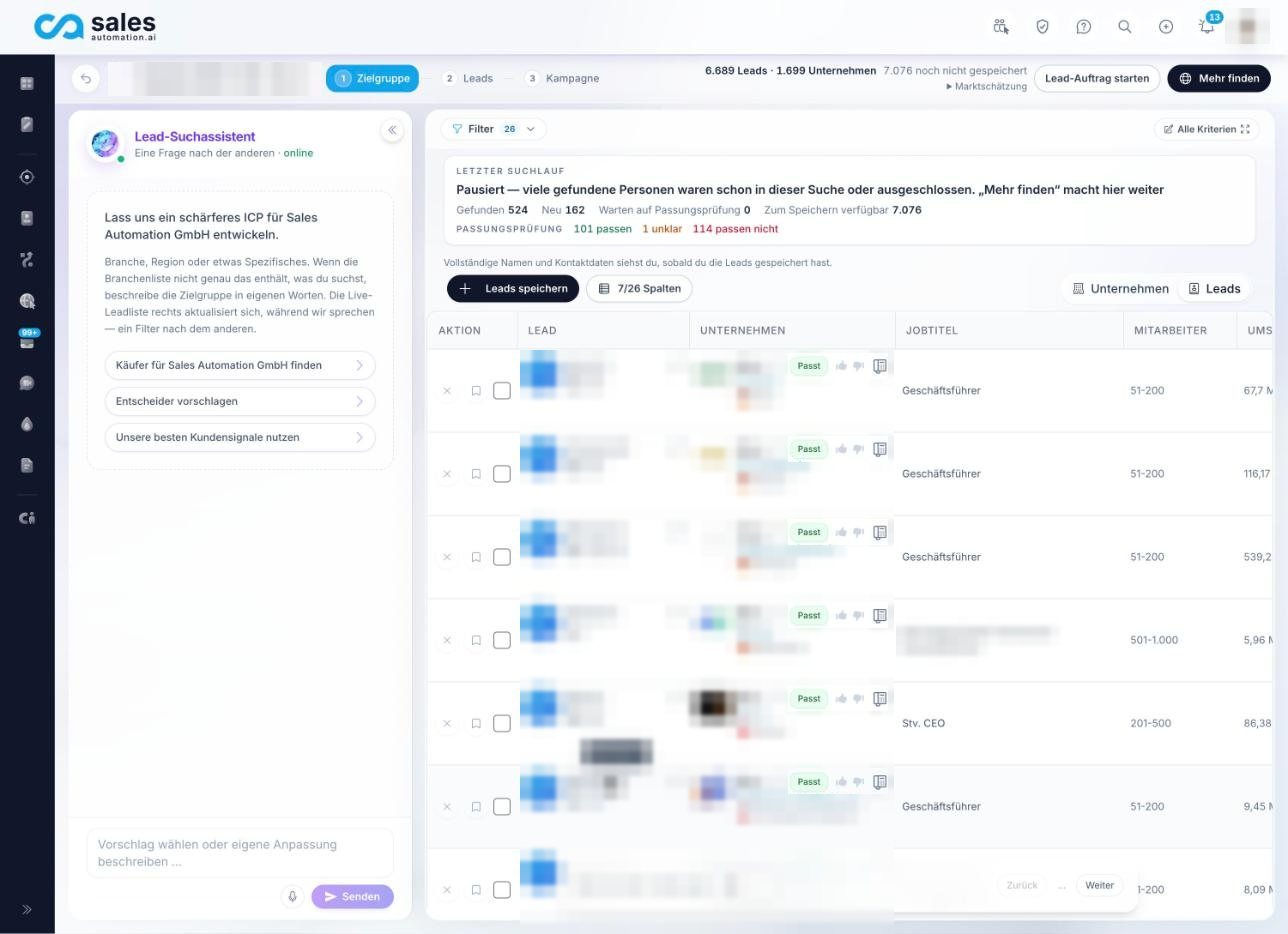
The AI Editor is the fastest way from an idea to a target audience. You describe your ideal customer in conversation, the platform turns that into filters and immediately shows matching companies.
Step 1
You describe
In your own words, who you are looking for.
Step 2
One question at a time
Region, job title, industry, example customers, size, exclusions.
Step 3
Suggestion cards
You choose “Apply” or “Skip”.
Step 4
Live results list
Each company is marked as fits, unclear or does not fit.
Simplified view of the conversation with the lead search assistant.
- The lead search assistant asks only one question at a time, for example about region, job titles, industry, example customers, size and exclusions.
- Whatever you name yourself is applied as a filter right away. The AI’s own ideas appear as suggestion cards that you decide on with “Apply” or “Skip”.
- The live results list on the right updates with every filter. Each company is checked and marked as “fits”, “unclear” or “does not fit”.
- With a thumbs up or thumbs down on a company, the check learns what you mean.
Try it now
Find your ICP right in the platform.
Enter your website, get target audience suggestions and review the matches. Start for free.
- 1Enter your website
- 2Review target audiences
- 3Check the matches
Chapter 9 of 13
You Want to Know Where Your Market Is: Competitor Analysis
Your question
Who am I up against, and which markets are there?
Your competitors reveal where the market is. Companies that sell similar offers usually target similar companies. That is why it pays to look at your competition when you test your ICP.
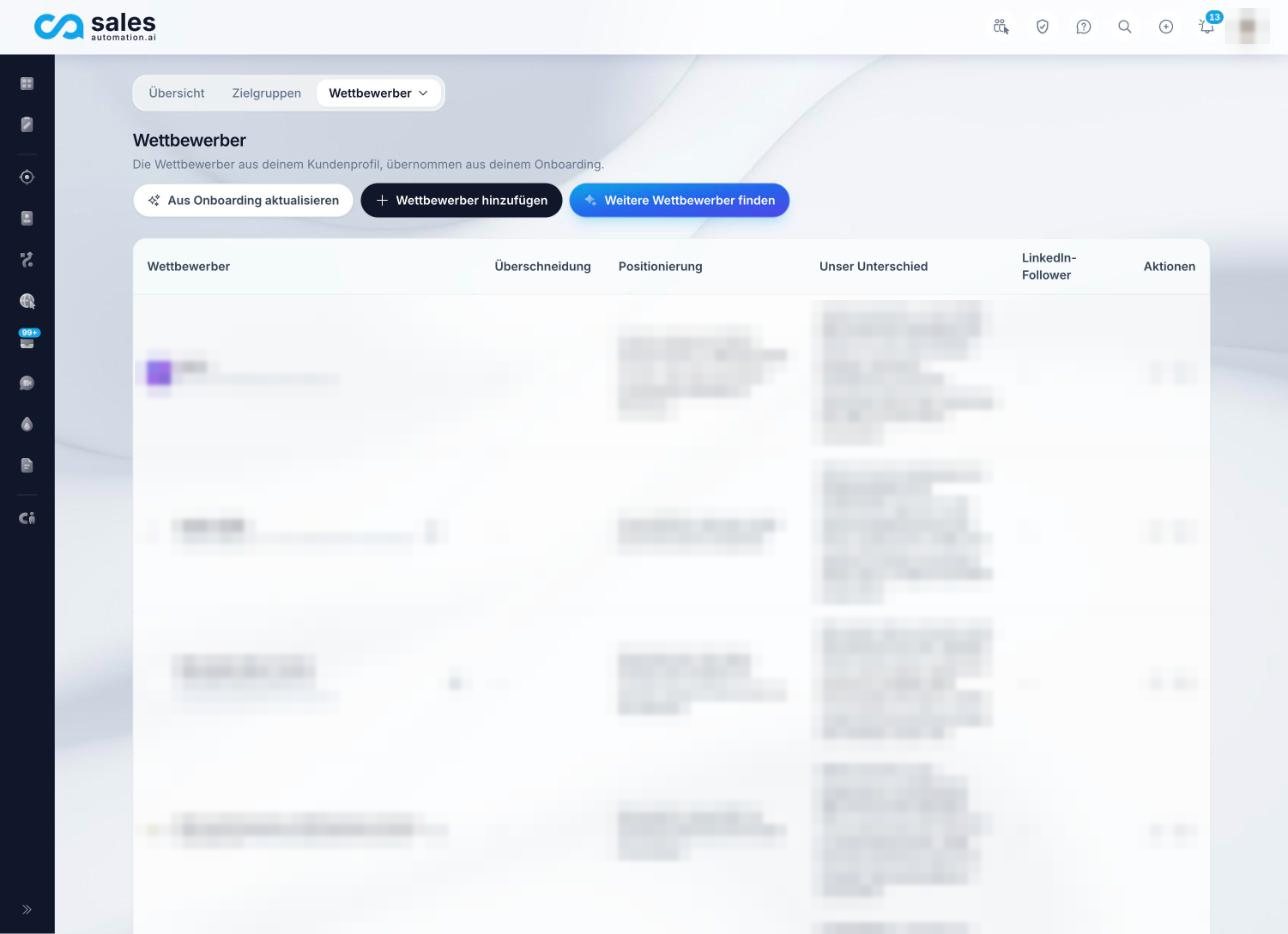
In the platform, you keep a competitor list. It is taken from your onboarding and you can add to it, and the AI finds more names with “Find more competitors”. For each competitor, you see the overlap (direct, partial or adjacent), their positioning and how you differ.
What competitor analysis does not do
It does not show who your competitors’ customers are. It gives you an overview of who you are up against and a basis for sharpening your profile against the market.
Chapter 10 of 13
You Sell Locally: Find Companies Near You
Your question
Who is based in my area, and whom can I visit in person?
Some offers sell best locally, for example service, maintenance or consulting with appointments at the customer’s site. Then the question is: how many matching companies are in my area, and whom can I visit in person?
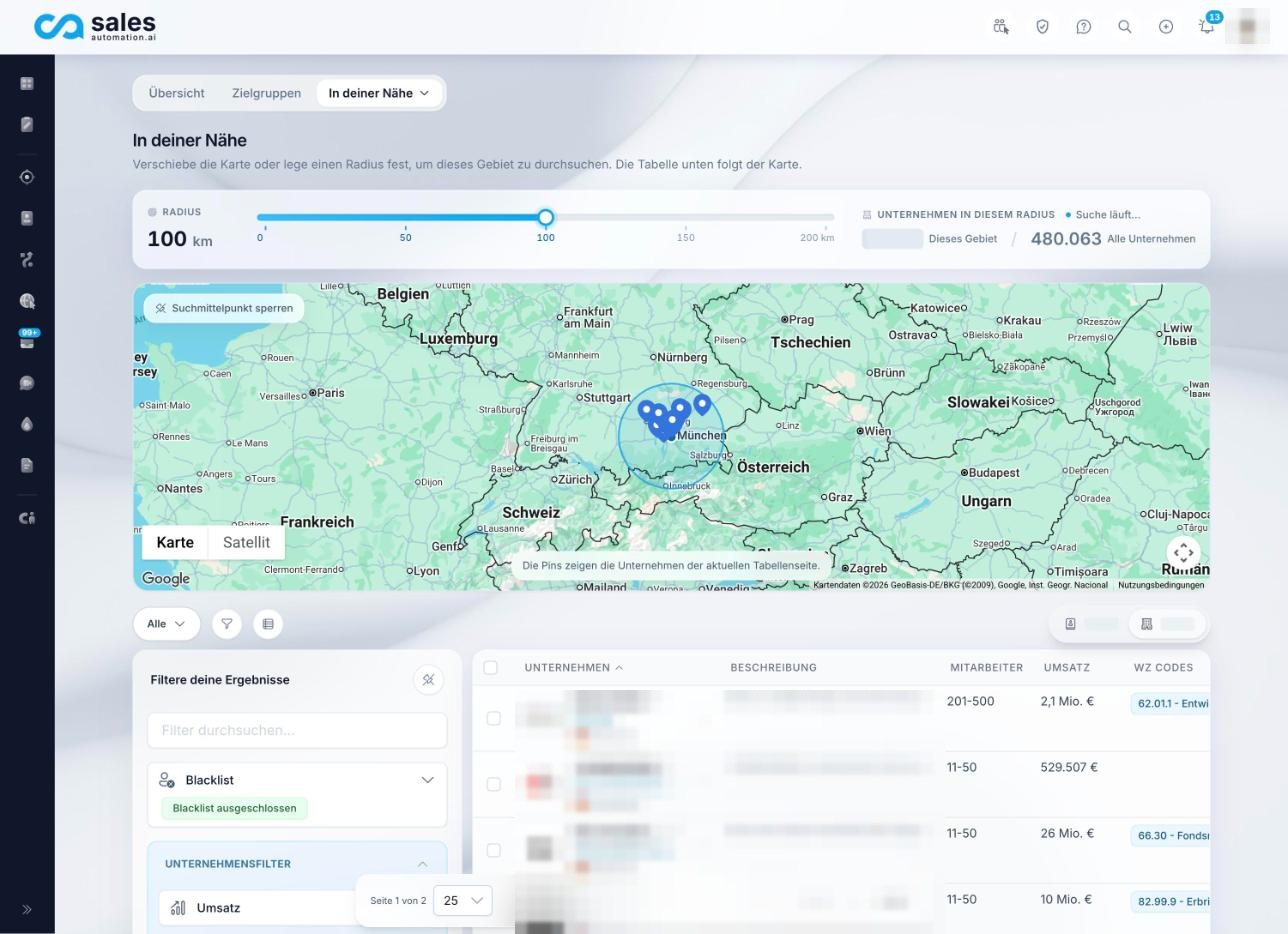
The “Around you” view shows a map around your company headquarters. With a radius slider from 0 to 200 kilometers, you set how far to search. The default is 100 kilometers. The table below follows the map and lists the companies in that area. You can combine it with the same filters as lead search, such as area, industry and size.
Good to know
Only companies whose location is already placed on the map are included. So the number within the radius is more of a lower bound than an exact count.
Chapter 11 of 13
ICP Template: B2B Target Audience Analysis on One Page
Use this ICP template to capture your ideal customer profile. Copy the table into a document. The example column shows how Ms. Krämer filled it in. The example is fictional.
| Building block | Key question | Example: Krämer Lagersoftware |
|---|---|---|
| Industry | Which industries buy from us most often? | Wholesale for technical products |
| Size | How many employees, what revenue? | 100 to 400 employees |
| Region | Where are the companies based? | Germany, Austria, Switzerland |
| Special trait | What do the best customers have in common? | Several warehouse locations |
| Roles | Who decides, who uses, who influences? | Managing director, head of logistics, head of IT |
| Signals | How do we recognize the right moment? | New location, new logistics hire |
| Anti-ICP | Who do we not contact? | Companies with only one warehouse |
| Source | How do we know? | Ten best customers and the lost proposals |
Try it now
Find your ICP right in the platform.
Enter your website, get target audience suggestions and review the matches. Start for free.
Chapter 12 of 13
Validate Your ICP: Is the Target Audience Really Right?
An ICP is an assumption. Test it before you put a lot of budget behind it. Three checks are enough to start:
- 1
Conversation test
Have ten conversations with companies from the profile. Count how many have a real problem that you solve.
- 2
Control group
Also contact a few companies that only just miss the profile. This shows whether your profile is too narrow or too broad.
- 3
Compare the numbers
Compare first meetings, proposals and closed deals by profile traits. Where things stall, the profile does not fit.
Common ICP mistakes
Common mistake
The ICP comes from gut feeling
Everyone agrees, but nobody has checked it against numbers.
Do it better
The ICP is based on real customers
Start with your ten best customers and the lost proposals.
Common mistake
Too many criteria
Ten conditions, and in the end no company fits.
Do it better
Three to five criteria
Choose the ones most of your best customers share.
Common mistake
Only firmographics, no roles
The right company is there, but you contact the wrong person.
Do it better
Company and role together
Define who decides, who uses and who influences.
Common mistake
No anti-ICP
Time and budget go to companies that will never buy.
Do it better
A clear counter-profile
Write down who you deliberately do not contact.
Common mistake
Fit without timing
Perfect companies where nothing is happening right now.
Do it better
Include signals
Contact the companies that fit and show a signal first.
Common mistake
The ICP never changes
It was set once and never looked at again.
Do it better
Review it regularly
Check the profile after ten conversations and then every quarter.
Chapter 13 of 13
Try It Now: Find Your ICP in the Platform
You do not have to do everything at once. Start with your website. The platform suggests first target audiences from it, and you see how many matching companies there are.
- 1
Enter your website
The AI reads your offer and suggests up to three target audiences.
- 2
Sign up
The suggestions become your first target audiences in the platform.
- 3
Sharpen
In the AI Editor, you adjust criteria and check the matches. Then you expand through similar companies, competitors and your local area.
Try it now
Find your ICP right in the platform.
Enter your website, get target audience suggestions and review the matches. Start for free.
- 1Enter your website
- 2Review target audiences
- 3Check the matches

About the author
Otto Lang
Co-Founder and Managing Director, Sales Automation GmbH
Otto Lang is co-founder and managing director of Sales Automation GmbH in Munich. He sold his first B2B sales automation company in 2022 and founded Sales Automation GmbH with Anton Lang in 2024.
He builds the platform this guide is based on and is available to customers in day-to-day projects. The examples and steps come from working with mid-sized B2B companies.